

You know that moment when the room goes quiet right before you hit record, and your gear either keeps up or it doesn’t? Picking the right audio interface and mixers setup decides whether vocals land clean, whether your stream sounds like a radio booth or a hallway, and whether your live show survives an unpredictable venue. This roundup walks through eight options that cover bedroom studios, podcast desks, family karaoke nights, and small stage rigs, so you can match a real piece of hardware to a real way you make sound.
The Picks In Brief

Yamnweo TF600 6-Channel Powered Mixer with Bluetooth
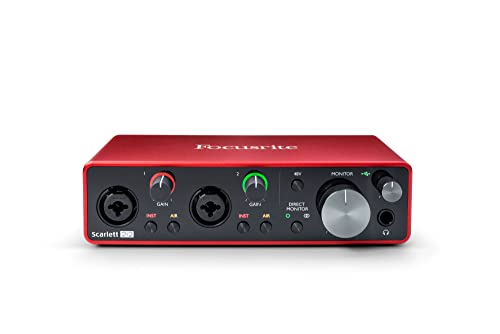
Focusrite Scarlett 2i2 3rd Gen USB Audio Interface
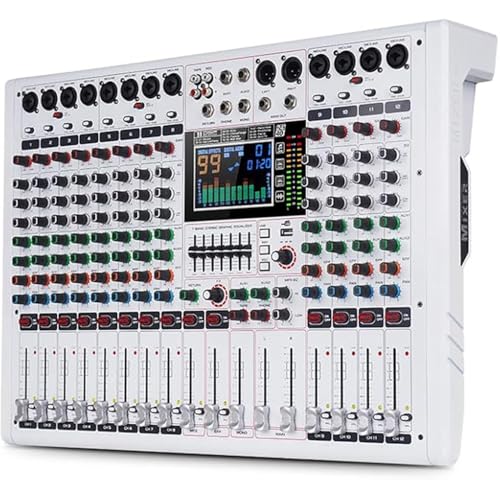
Yamnweo GF12 PRO 12-Channel Stage Performance Mixer

Yamnweo MW-6 6-Channel DJ Mixer with 99 DSP Effects

Focusrite Scarlett Solo 3rd Gen USB-C Audio Interface

TENLAMP G10 Creator Audio Mixer Bundle with Microphone
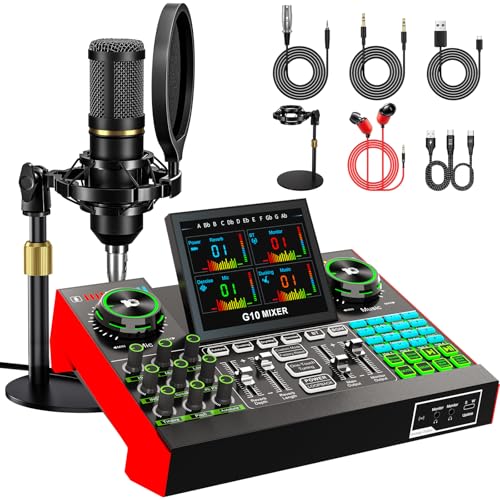
TENLAMP G10 Creator Podcast Equipment Bundle

TENLAMP G9 Audio Mixer Bundle for Streaming and Karaoke
Taking A Closer Look At The Options
The Yamnweo TF600 sits in a category that blurs the line between mixer and amplifier: it packs its own power output, so you can run passive speakers directly from the unit without a separate amp rack. For small bars, house parties, and mobile DJs who want fewer boxes to haul, that built-in amplification is the headline feature.
Six input channels give a solo performer or small group enough headroom for vocals, a couple of instruments, and a Bluetooth-fed backing track. The 7-stage equalizer lets you sculpt tone across wider frequency bands than a typical 3-band channel EQ, and 99 DSP (digital signal processing) effects cover standard reverb, delay, and vocal thickening presets. The USB recording input is a quiet bonus for capturing rough mixes straight to a thumb drive.
The Helpful Details
- Two 450W amplifier outputs drive passive speakers without a separate amp.
- Bluetooth input streams backing tracks from a phone without a cable mess.
- 99 onboard DSP effects give vocalists usable reverb without outboard gear.
- USB recording captures live sets directly to removable storage.
Worth Noting
- Powered mixers generate heat; ventilation around the rack matters in enclosed booths.
- Channel count caps out at six, so a four-piece band with multiple keys may feel tight.
Who It Suits Best
Mobile solo performers, karaoke hosts, and small-venue operators who want amplification and mixing in one box.
Where Another Pick Suits Better
Studio-focused songwriters recording at a desk will get cleaner results from the Focusrite Scarlett 2i2 3rd Gen, since it prioritizes low-noise preamps over raw speaker power.
Step from a live stage to a bedroom desk, and the rules change. You stop needing watts to push air through a room and start needing clean gain (the quiet amplification that brings a mic signal up to a recordable level) and honest conversion. The Focusrite Scarlett 2i2 has anchored home studios for that exact reason: two genuinely quiet preamps, instrument inputs for guitar or bass, and a footprint small enough to live next to a laptop.
Compared to the Yamnweo TF600, the 2i2 does almost nothing on stage and almost everything at the desk. The switchable Air mode adds upper-frequency presence to acoustic sources, a touch that flatters acoustic guitar and voice. Gain Halos around the input knobs glow green, amber, or red, so you know at a glance whether your take is sitting in the sweet spot. The two balanced outputs feed studio monitors without adding hiss.
The Upside
- Two high-headroom instrument inputs handle a guitar and a vocal at the same time.
- Switchable Air mode lifts acoustic recordings without external processing.
- USB bus-power means one cable to the laptop and nothing else.
- Gain Halos make level-setting visual, even for first-timers.
Things To Consider
- Two inputs cap a duo, not a full band tracking simultaneously.
- No DSP effects onboard, so reverb and compression come from your DAW (digital audio workstation) software.
Built With In Mind
Bedroom producers, podcast duos, and singer-songwriters who record mostly one voice and one instrument at a time.
Look Elsewhere When
Live performers running a small PA will outgrow the 2i2 quickly, and the Yamnweo TF600 6-Channel Powered Mixer makes far more sense for that scenario.
The GF12 PRO is the TF600’s bigger sibling, the kind of mixer you spot on a side table at a mid-size bar gig. Twelve channels are enough to absorb a four-piece band with room for two vocalists and a stereo playback feed, which is where the smaller MW-6 starts to sweat.
Where this one stands apart is the large color LCD screen. You get a clear read on channel levels, effect settings, and routing without leaning over the desk mid-show. Independent mute switches per channel let the sound engineer silence a stage wedge (a speaker pointing back at the performer) or a problem mic without riding the fader. The 7-stage equalizer and 99 reverb presets mirror the TF600’s processing toolset but with more headroom and cleaner control surface.
Real-World Strengths
- Twelve channels handle full bands plus playback sources.
- Color LCD makes menu navigation faster under stage lighting.
- Independent channel mutes help during quick instrument changes.
Trade Offs
- Bulkier than a 6-channel unit, so a tight home desk may struggle to fit it.
- The 7-stage EQ curve takes practice; beginners may default to the channel 3-band until they learn the wider sculpting.
Made For
Small-to-mid band setups, church audio volunteers, and community theater crews who need more routing than a 6-channel can offer.
Not Your Match When
Solo podcasters will find the channel count excessive, and the TENLAMP G10 Creator Audio Mixer Bundle delivers voice-specific tools with far less menu-diving.
The MW-6 is built to be picked up and carried. Its plug-and-play pitch is straightforward: drop it next to a laptop, plug in a USB-B cable (a square-shaped USB connector common on audio gear), and the built-in recording sound card handles input and output. For streamers who don’t want a thick rack of gear next to the camera, that portability is the whole game.
Compared to the TF600, the MW-6 drops the built-in amplification in favor of a smaller footprint, which makes it a better desk partner than a stage partner. DSP effects cover everyday vocal touches and instrument textures, though serious producers will likely want to swap in software plugins (add-on processors that run inside your recording software) later. The white chassis is a small but real visual win for on-camera setups, where dark gear tends to look heavy and busy under ring lights.
Where It Helps
- USB-B plug-and-play avoids driver headaches on most laptops.
- Compact shell fits next to a camera and stream deck without dominating the frame.
- 99 DSP effects cover reverb, delay, and modulation presets out of the box.
Points To Note
- No amplification on board, so passive speakers still need a separate amp.
- Cleaning the glossy white finish shows smudges faster than darker units.
The Right Fit
Family-party DJs, on-the-go streamers, and home podcasters who need a mixer that travels and looks presentable on camera.
Skip It When
Anyone driving passive speakers directly without an external amp should step up to the Yamnweo TF600 6-Channel Powered Mixer, which carries its own power output.
If the Scarlett 2i2 is the home-studio workhorse, the Scarlett Solo is the door you walk through first. One mic preamp, one instrument input, and a USB-C cable are all the gear you need to record a vocal over a guitar, which describes the bulk of singer-songwriter setups.
The conversion runs at 24-bit/192kHz, which is professional-grade resolution for the price tier. The single preamp carries the same Air mode you find on the 2i2, so acoustic instruments retain a touch of presence without plug-ins. Versus the 2i2, the trade-off is honest: you lose a simultaneous second input, but you gain simplicity, and a first-time recorder rarely needs more than one voice and one instrument anyway.
Positive Points
- Single-cable USB-C power and data simplifies any laptop setup.
- 24-bit/192kHz conversion delivers recording quality well above its tier.
- Same Air mode preamp as its bigger siblings for acoustic sparkle.
Honest Caveats
- Only one mic input, so two-person interviews need an adapter or a different unit.
- Headphone monitoring shares volume with main output, which is awkward during tracking sessions.
Whose Shelf It Belongs On
First-time songwriters, students, and anyone recording solo acoustic sessions who wants Focusrite sound without paying for unused inputs.
Reach For A Different Pick When
Two-mic podcast duos will find the Scarlett 2i2 3rd Gen far more practical, since it gives each host their own preamp.
The TENLAMP G10 Creator Audio Mixer Bundle is built for a specific person: the streamer who wants a polished on-air sound without building a chain of separate processors. Inside the box sits a mixer, a condenser microphone (a mic that needs external power and is sensitive to vocal detail), and the cables to make them talk to each other.
Built-in noise reduction cleans up the hum of a desktop fan or a neighbor’s AC, which matters more than raw mic quality in untreated rooms. Voice effects, including auto-tune style processing, add a layer that producers either love or mute, depending on the channel’s tone. Bluetooth input lets a co-host’s phone or a backing track jump in without a cable swap, and the unit’s footprint keeps a streaming desk tidy.
Everyday Perks
- All-in-one bundle removes the guesswork of matching a separate mic and interface.
- Built-in noise reduction helps in rooms without acoustic treatment.
- Bluetooth input accepts guest phones or music sources on the fly.
Soft Spots
- Condenser mic picks up room echo more than a dynamic mic, so a treated space still helps.
- Voice effects and auto-tune are polarizing; purists will disable them.
Best Suited To
New streamers, content creators, and podcasters who want one bundle that ships with everything wired up.
Another Choice May Suit When
Musicians prioritizing raw recording fidelity should consider the Focusrite Scarlett Solo 3rd Gen, which trades voice effects for cleaner conversion.
The TENLAMP G10 Creator Podcast Equipment Bundle is a sibling to the streaming version, but the included 3.5mm condenser mic and the G10 sound board target a slightly different shape of creator: the podcaster. Compared to the streaming version, this bundle leans into simple mic-and-board pairing, with the G10 sound board acting as the routing hub for 3.5mm, 6.35mm, and 48V microphones (a phantom power standard that powers professional condenser mics through the same cable that carries audio).
You won’t find a complicated DSP effect menu here; the focus is on a clean signal path and broad mic compatibility. For a first podcaster, that matters: there’s nothing worse than a guest arriving with a 6.35mm (quarter-inch) jack and discovering the host’s interface only accepts XLR (a three-pin professional audio connector). The G10 covers both, which keeps the show on schedule.
Strong Points
- Accepts 3.5mm, 6.35mm, and 48V microphones without adapters.
- Simple signal path keeps the learning curve gentle.
- Bundle ships with a condenser mic and disc bracket for desk mounting.
A Few Limitations
- Fewer voice effects than the streaming version, so creative sound design requires extra software.
- 3.5mm condenser mics are sensitive to room noise, so a quiet space still matters.
Perfect Match For
First-time podcast hosts launching a two-mic show and wanting broad mic compatibility on day one.
Swap It Out When
Singers and live-stream creators will appreciate the noise reduction and effects on the TENLAMP G10 Creator Audio Mixer Bundle, which is tuned for that workload.
The TENLAMP G9 rounds out the list by targeting a use case that most pro-grade interfaces ignore: living-room karaoke and family sing-alongs. The G9 pairs a 3.5mm condenser microphone with a mixer that supports 3.5mm and 6.35mm dynamic inputs, plus 48V phantom power for users who eventually upgrade to a professional condenser mic.
Smart noise reduction does the heavy lifting in untreated spaces, which describes most spare bedrooms. The voice effect presets lean into crowd-pleasing, including pitch shifts, echo, and reverb tails that flatter casual singers. Bluetooth input lets a phone feed karaoke tracks, and the whole bundle ships ready to mount on a desk or small stand. Compared to the G10 streaming bundle, the G9 trades some pro controls for a friendlier entertainment-first feature set.
A Favorable Mix
- Smart noise reduction handles typical room echo without external processing.
- Voice effects are tuned for entertainment, not podcast neutrality.
- Bluetooth input feeds karaoke tracks from a phone in seconds.
Where It May Fall Short
- Entertainment-tuned effects can muddy spoken word; podcasters should pick the G10 podcast bundle instead.
- Condenser mic sensitivity rewards a quieter room, especially in homes with HVAC (heating, ventilation, and air conditioning) noise.
Who Should Grab It
Households hosting karaoke nights, casual streamers, and gift-givers who want a turnkey entertainment kit in one box.
A Better Fit Elsewhere
Anyone focused on professional voiceover or studio music recording should look at the Focusrite Scarlett 2i2 3rd Gen for cleaner preamps and truer signal capture.
Matching Audio Interface And Mixers To Your Real Workflow
Decide What Job The Gear Has To Do First
Before comparing specs, write down what you’re actually trying to do with the audio interface and mixers setup. Recording vocals over a guitar at home is a different ask from running a four-piece live show, and matching the job to the hardware saves money and frustration. A Focusrite Scarlett-class interface covers the home studio because the bottleneck there is clean gain, not speaker power. A powered mixer like the Yamnweo TF600 fits a small venue because amplification lives inside the unit, and you avoid hauling an extra amp rack.
Channel Count And Routing Shape Your Day
Channel count is the single most underestimated number on the spec sheet. A solo podcaster with one mic is fine on a 2-channel interface, while a mid-size band needs 8, 12, or more to avoid constant repatching. Routing matters just as much: independent mute buttons, dedicated monitor sends, and USB record outputs all change how a live or recording session flows. The Yamnweo GF12 PRO shows what 12 well-routed channels look like, while the MW-6 keeps things tight for a one-person DJ booth.
Connectivity And Software Shape Long-Term Use
USB-C, USB-B, and traditional USB-A all appear in this category, and matching the cable standard to your laptop avoids dongle clutter. 48V phantom power becomes important the moment you upgrade from a bundled condenser mic to a professional XLR model. Software bundles also matter, and the Focusrite Scarlett line is widely known for including a usable DAW and plug-in package to get new owners recording on day one. Audio interface and mixers setups that arrive as full bundles, like the TENLAMP G10 bundles, also remove the compatibility guesswork that catches first-time creators off guard.
Key Considerations Across These Picks
Common Slip Ups First Timers Hit
A frequent misstep is buying a powered mixer for a bedroom studio, where the amplification does nothing and the channel EQ gets in the way of clean recording. The reverse mistake is buying a two-channel interface for a live show, then scrambling for splitters and adapters. Confirming your real environment before browsing saves both headaches. Audio interface and mixers setups are easier to evaluate when you know whether the priority is recording fidelity, stage amplification, or streaming polish.
Where The Extra Money Goes In Higher-Tier Picks
Stepping up from a 2-channel interface to a 12-channel mixer buys you more routing, better build quality, and quieter preamps (the small built-in amplifiers that boost a mic’s faint signal), all of which show up under stress rather than on day one. Premium models also tend to include more durable faders (sliding volume controls), higher-resolution displays, and broader effect libraries. The honest read is that beginners rarely need those upgrades, while mid-size venues and serious producers feel the difference every session.



