

Going live with a USB mic straight into your laptop is fine for the first dozen streams, then the ceiling shows up fast. Background hum, flat vocals, and zero control over game audio versus voice send you hunting for a small interface that can actually do the work. That’s where a dedicated PC audio mixer earns its spot on the desk.
You don’t need a recording-studio budget to clean up your sound. The picks below span beginner streaming kits, podcast bundles for two, and pro-grade interfaces for music production. Each one solves a different bottleneck, so match the tool to the job, not the spec sheet.
The Leading Options At A Glance
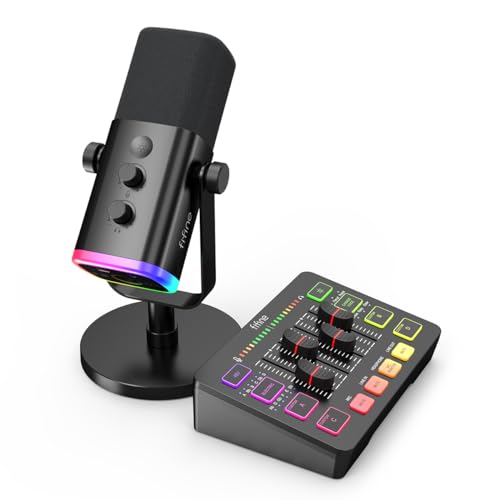
FIFINE Gaming Audio Mixer Bundle SC3+AM8

Arturia MiniFuse 2 Audio & MIDI Interface

FIFINE SC3+K688 XLR/USB Streaming Bundle

Focusrite Scarlett 18i8 3rd Gen Interface

TENLAMP G10 Creator Audio Mixer Bundle Dual Mics

TENLAMP G10 Creator Audio Mixer Bundle with Microphone

TENLAMP G9 Audio Mixer Bundle with Microphone
More Details On Our Top Picks
For Twitch nights and Discord raids, the SC3 mixer pairs with FIFINE’s AM8 dynamic mic to give you a full starter rig in one box. The 4-channel board runs game audio, voice, music, and a fourth aux source side by side, so you can finally stop tabbing into Windows volume sliders mid-match.
Where this kit earns its fun is the personality layer: built-in voice effects, auto-tune modes, and four programmable sound pads for meme drops. RGB lighting cycles in a steady rhythm that reads on camera without blinding you during a late stream. The 48V phantom power also opens the door to condensers later, which makes this a stepping stone rather than a dead end.
The Good Stuff
- Four channels let you mix game, voice, and music independently without alt-tabbing.
- Dynamic cardioid mic rejects off-axis keyboard noise, which matters in loud rooms.
- Built-in effects and sound pads add personality without extra software.
- 48V phantom power supports future condenser upgrades.
- RGB lighting stays visible on stream without harsh glare.
Things To Consider
- The mic runs on USB, so it ties up a port and limits placement flexibility.
- Effect menus are fun, but a few presets feel gimmicky for serious recording.
Key Product Details
Who Will Love This
Casual streamers and gamers who want voice effects, sound pads, and a clean on-stream look without juggling software.
Consider Something Else When
Solo podcasters focused on vocal clarity should look at the Arturia MiniFuse 2, which skips the gimmicks for cleaner recording.
The MiniFuse 2 is the smallest interface here, and that size is the whole point. It tucks behind a monitor or beside a laptop without dominating the desk, and the USB-C cable keeps your cabling simple. For anyone making beats, tracking vocals, or just starting a home studio, this hits a tidy sweet spot.
Unlike the FIFINE kits above, this is a proper audio interface, so its strength is signal quality, not streaming effects. MIDI I/O means a small synth or MIDI controller can plug straight in, and the preamps stay clean enough for serious vocal takes. The shell is plastic, but Arturia’s stated 5-year warranty suggests they trust the build.
The Value In It
- Compact footprint fits cramped desks and mobile rigs.
- USB-C power and data through one cable simplifies setup.
- MIDI I/O opens the door to hardware synths and controllers.
- Long warranty coverage suggests confidence in long-term reliability.
Points To Note
- Only two inputs limit you for full band or drum recording.
- No built-in effects, so character comes from your DAW and plugins.
Made For
Bedroom producers and singer-songwriters who want clean preamps and MIDI capability in a small package.
A Better Fit Elsewhere
Streamers chasing RGB flair and one-tap voice effects will get more out of the FIFINE Gaming Audio Mixer Bundle SC3+AM8.
The SC3+K688 pair is the path of least resistance for someone leaving the USB mic world behind. You get FIFINE’s 4-channel RGB mixer plus the K688 dynamic mic, which runs both XLR into the mixer and USB straight to your computer. That dual-mode design is a safety net for anyone worried about driver hassles.
Tap-to-mute on the front panel beats fumbling for a button mid-game, and the gain knob lets you tune input levels without opening software. The K688’s signal-to-noise ratio above 80dB keeps hiss out of quiet vocal moments, and 48V phantom power on the mixer opens future condenser options.
Everyday Advantages
- Dual XLR/USB mic connection provides flexibility during setup.
- Tap-to-mute on the front panel is quiet and fast for live sessions.
- Signal-to-noise ratio above 80dB keeps vocals clean and hiss-free.
- RGB lighting adds on-stream presence without driving up complexity.
Worth Noting
- Tap-to-mute and gain control only function over USB, not XLR.
- Four channels are enough for solo work, tight for multi-host setups.
Feature Snapshot
Best Suited To
First-time XLR upgraders who want a complete starter rig with a fallback USB option for travel.
Reach For A Different Pick When
Two-person podcasts should consider the TENLAMP G10 Dual Mics bundle, which ships with matched condensers ready for co-hosting.
The Scarlett 18i8 is the heavyweight of this list, aimed at home studios recording full bands, drum sessions, or layered production work. Where the FIFINE kits trade on streaming fun, this interface trades on conversion quality and routing flexibility, which is the kind of thing that pays off when tracks start stacking.
Eight inputs means a small drum kit, a guitar, a bass, and vocals can all run through one box. The Scarlett preamps are a known quantity among bedroom producers, and the high-resolution converters preserve the detail that cheaper interfaces often blur. Streaming is possible through virtual routing, but this is built for production, not personality.
Standout Benefits
- Eight inputs support multi-source recording sessions.
- Studio-grade conversion captures detail in layered mixes.
- Scarlett preamps deliver clean, consistent gain across all channels.
- USB connection keeps the setup cable-light.
Less Ideal Details
- Larger footprint demands a dedicated desk space or rack shelf.
- No RGB or built-in effects, so it is the wrong tool for personality-driven streaming.
Spec Overview
Who Should Grab It
Project studio owners, producers, and small bands who track multiple sources at once and value clean conversion.
Swap It Out When
Solo creators chasing RGB lighting and sound effects will find the FIFINE Gaming Audio Mixer Bundle SC3+AM8 more useful for live content.
Most PC audio mixers are designed for one voice, but the G10 Dual Mics bundle is built for two. The G10 mixer comes with matched 3.5mm condenser microphones and desktop stands, so a co-hosted podcast, interview show, or couples gaming stream can be up and running in minutes.
The condensers capture both voices in matched tone, which avoids the lopsided sound you get from mixing two different mics. Where the FIFINE kits lean on RGB drama, the G10 keeps the visual profile simple so the focus stays on the conversation. For two-person content, the savings on a second interface add up fast.
Everyday Wins
- Dual condenser mics match tonal balance between co-hosts.
- Desktop stands included for an out-of-box two-person setup.
- G10 mixer handles two voice inputs without extra routing gear.
- Compact design fits on a small shared desk.
Honest Caveats
- 3.5mm condenser mics offer less headroom than XLR rigs in loud rooms.
- Without a pickup pattern specification, ambient noise could creep in during busy environments.
Right Fit For
Podcast duos, interview shows, and couple gaming channels that need a matched two-mic setup without buying a second mixer.
Look Elsewhere When
Solo streamers who want built-in voice effects and Bluetooth should step up to the TENLAMP G10 with Microphone bundle instead.
This G10 bundle is the solo-creator version of the platform, packing a condenser mic and a full effects suite into a single kit. Noise reduction cleans up room echo, voice effects and auto-tune give karaoke-style flair, and Bluetooth input lets you drop backing tracks from a phone without a cable.
For singers, karaoke hosts, and streamers who treat the mic as a performance tool, the layering of effects is what makes this fun. The kit ships as a complete audio solution, which is helpful for anyone who would rather not chase down a pop filter, boom arm, and cables separately. Build quality is plastic, so careful storage matters if you travel with it.
The Case For It
- Built-in noise reduction cleans up untreated rooms.
- Voice effects and auto-tune add karaoke-friendly character.
- Bluetooth input accepts wireless audio sources for backing tracks.
- All-in-one kit skips the need to source cables and accessories.
Where It May Fall Short
- Plastic housing is more travel-fragile than metal-cased alternatives.
- Effects-heavy design is less suited to neutral vocal recording.
Quick Facts
Perfect Match For
Solo streamers, singers, and karaoke performers who want built-in effects and a complete kit ready to go.
Where Another Pick Suits Better
Two-person podcasts will find better matched coverage in the TENLAMP G10 Dual Mics bundle, which ships two condensers.
The G9 covers the most ground per dollar when you treat your PC as a multi-use hub. The 3.5mm condenser handles voice work, the mixer routes game audio, music, and voice into your stream, and noise reduction keeps the room from bleeding into your takes. The powered-mixer classification hints at a stronger output stage for headphones and small monitors.
Where the G10 bundles lean into creator aesthetics, the G9 keeps things plain and functional, which is helpful for home entertainers who do karaoke nights, then pivot to podcasting or streaming the next morning. The condenser mic favors detail over rejection, so quiet rooms help you get the cleanest result.
Where It Excels
- Multi-source routing handles streaming, karaoke, and gaming in one box.
- Built-in noise reduction trims room noise from condenser mics.
- Powered output stage supports headphones and small monitor speakers.
- Versatile kit works across karaoke, podcast, and game-streaming sessions.
Soft Spots
- Condenser mic pattern is more sensitive to room noise than dynamic alternatives.
- 3.5mm connection caps upgrade paths compared to XLR setups.
The Numbers That Matter
Whose Shelf It Belongs On
Home entertainers and multi-hobby creators who split time between karaoke, streaming, and casual gaming.
Skip It When
Studio producers tracking instruments should look at the Focusrite Scarlett 18i8 3rd Gen, which has the inputs and conversion for serious music work.
What To Look For In A Pc Audio Mixer
Connectivity And Inputs
A “PC audio mixer” usually means a small interface that sits between your computer and your microphone, plus a few other audio sources. USB-C is the cleanest modern hookup, while older USB-B still works fine for most desktops. XLR inputs matter the moment you outgrow a USB mic, since dynamic and condenser studio mics rely on that balanced connection. 48V phantom power is the small electrical current that powers condenser mics, and a mixer without it locks you out of that upgrade path.
Channel Count And Routing
A 2-channel interface covers solo creators cleanly. A 4-channel mixer adds game audio, music, and an aux source for co-streaming or sound effects. Anything beyond that, like the 8-input Scarlett 18i8, supports multi-mic band recording. The honest read is that most solo streamers never need more than four channels, and overbuying inputs usually just means more knobs you will not touch.
Effects Versus Signal Quality
Streaming-focused mixers lean on RGB lighting, voice effects, auto-tune, and sound pads for personality. Production-focused interfaces skip the flash and invest in better preamps (the small amplifier circuits that boost mic-level signals) and analog-to-digital converters (the chips that translate your analog sound into data your computer can record). Match the tool to the work: streaming kits suit personality-driven content, and audio interfaces suit music.
Bundles Versus Standalone Mixers
A bundle, like the FIFINE SC3+AM8 or the TENLAMP G10 sets, arrives with a mic, stands, and cables ready to plug in. A standalone mixer assumes you already own a microphone. Bundles save setup time and keep the budget predictable, but the included mic sometimes caps the ceiling for serious vocal work, so plan a future upgrade path.
Common Slip Ups And Where The Extra Money Goes
Where Shoppers Go Wrong
The most common mistake is chasing channel count over preamp quality. Eight noisy channels sound worse than two clean ones, and preamp hiss is hard to remove after recording. Another trap is buying a streaming mixer for music work, or a studio interface for personality-driven content. Each tool is built for a different job, and mismatched purchases usually end up on a shelf. Watch for phantom power too, since picking a mixer without it cuts you off from condenser mics entirely.
When Paying More Pays Off
Higher-tier interfaces charge more for quieter preamps, better converters, and longer warranty support, which matters if the box runs hot for hours. The Scarlett 18i8 costs more because it records eight sources at once with clean conversion, which is irrelevant for solo streamers and essential for band sessions. The honest trade is that paying up pays off when you actually use those features. If the extra inputs or higher bit depth (the resolution at which your analog signal is sampled into digital data) will sit idle, you are paying for hardware that gathers dust.



