

Streaming, podcasting, or just running a clean chat mix for ranked play, a dedicated audio mixer pulls your sound out of the swamp of software tabs and jagged webcam mics. The eight gaming sound mixers below cover the full spread: broadcast-console flagships, creator-focused all-in-one kits, and one analog workhorse that doubles as a tidy streaming hub.
The Picks In Brief

TC-Helicon GoXLR Broadcaster Platform with Motorized Faders

MAONO G1 Neo Gaming Audio Mixer with XLR & 48V

TENLAMP G10 Creator Audio Mixer Bundle with Dual Mics

TENLAMP G10 Creator Audio Mixer Bundle with Microphone

TENLAMP G3 Creator Audio Mixer Bundle with Microphone
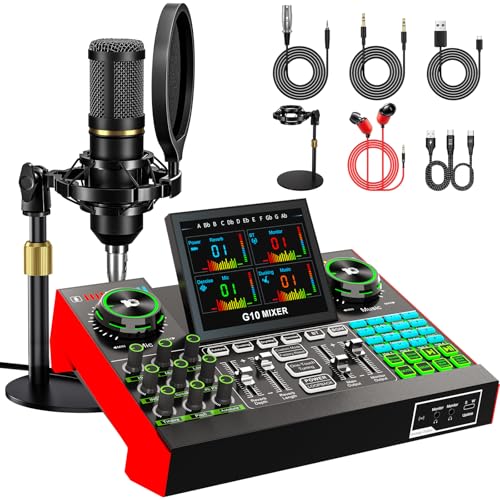
TENLAMP G10 Creator Podcast Equipment Bundle with Microphone

YAMAHA MG10XU 10-Input Stereo Mixer with Effects

TENLAMP G9 Audio Mixer Bundle with Microphone for Streaming & Karaoke
A Deeper Look At The Lineup
The GoXLR feels like a tiny broadcast console parked next to your keyboard, and for many streamers that is exactly the point. Four channels of mixable audio, motorized faders that physically move when you swap profiles, and a deep effects engine live in one Windows-friendly box. Compared to the simpler bundles further down this list, this is the pick when your stream has grown past a single mic and a Discord tab.
For anyone running a multi-source show, the routing flexibility alone justifies the desk space. You can dedicate a fader to your mic, game audio, music, and chat independently, then save the whole layout as a profile for different games or moods.
Standout Benefits
- Motorized faders move automatically when you load a saved profile, so a quick scene swap never leaves your levels out of whack.
- Onboard vocal effects let you tweak EQ, reverb, and pitch without opening a separate DAW (digital audio workstation).
- Sample playback buttons let you trigger meme sounds, stingers, and outros mid-stream without alt-tabbing.
- Built-in headphone amp drives most monitoring headphones cleanly, removing one extra piece of gear from your desk.
- Routing is software-driven, so labeling each fader for game, music, chat, and mic makes daily use feel intuitive.
Things To Consider
- Officially Windows-only, so macOS creators will need to look elsewhere on this list.
- Owners commonly report that the companion software updates occasionally need a clean reinstall after major Windows builds.
- The footprint is wider than a typical streaming deck, so shallow desks may feel cramped.
Who It Suits Best
Streamers who want broadcast-style control and are willing to invest time in software profiles benefit most from the GoXLR’s depth.
Skip It When
The MAONO G1 Neo suits solo creators on tighter desks or budgets who don’t need four channels of motorized control.
Where the GoXLR is a full console, the G1 Neo is a focused little box with a real XLR input and 48V phantom power, the small electrical current condenser mics need to operate, tucked into a footprint that disappears on a cluttered desk. If you have been eyeing condenser microphones but your audio interface is bigger than your keyboard tray, this is a friendlier bridge.
It’s the kind of gear that lets a single creator step up from a 3.5mm lavalier to a real studio condenser without hauling a rack-sized interface into the room.
Why It Works Well
- Genuine XLR input with 48V phantom power opens the door to serious condenser microphones.
- Compact shell leaves room for a mousepad and a second monitor on smaller desks.
- RGB accents blend into gaming setups without screaming for attention.
- Onboard sound effects cover the basics most new streamers actually use.
Honest Caveats
- Fewer routing options than larger broadcast mixers, so multi-host shows may feel squeezed.
- Owners commonly report that learning the button layout takes a few sessions before muscle memory kicks in.
Made For
Solo creators working from compact desks who want their first real XLR upgrade without buying a full interface.
Where Another Pick Suits Better
The TC-Helicon GoXLR serves streamers who run four or more audio sources and want motorized fader control.
Most creator bundles ship with one mic, which is fine until you start a co-hosted show and suddenly need a second voice on a clean channel. The TENLAMP G10 dual-mic bundle skips that problem by including two matched 3.5mm condensers and the G10 mixer in one box, which makes setup as close to plug-and-play as the category gets.
Couples gaming, interview podcasts, and just-chat streams with a friend are the use cases this kit was clearly built around.
Where It Helps
- Two matched condenser microphones capture two voices without mismatched tone or level.
- Single-bundle ordering removes the guesswork of pairing a mixer with compatible mics.
- Desktop stands ship in the box, so you can start recording the day the package arrives.
Points To Note
- 3.5mm condensers are convenient but generally don’t match the depth of XLR studio mics.
- The included stands tend to be lightweight, so expect a bit of wobble if your desk gets bumped during intense moments.
Best Suited To
Duo streamers and co-hosted podcasters who want a matched two-mic setup without buying components separately.
Reach For A Different Pick When
The TENLAMP G10 single-mic bundle suits solo creators who plan to grow into an XLR microphone later on.
This G10 variant leans into personality: noise reduction for keyboard-heavy streams, voice effects for skits, auto-tune for musical moments, and Bluetooth input so a phone can drop into the mix without a cable. It’s the bundle for creators who treat their stream as a show rather than just a gameplay window.
Bluetooth audio in is genuinely useful for taking calls, queueing background music, or pulling audio from a tablet for screen-share segments.
A Few Strong Suits
- Built-in noise reduction helps tame mechanical keyboard clatter without post-processing.
- Voice effects and auto-tune add entertainment value for variety streamers and musical guests.
- Bluetooth input removes one cable from the streaming rig while still letting a phone feed audio in.
Worth Bearing In Mind
- Bluetooth adds latency (a small audio delay) that can feel off in fast-paced rhythm or timing-based content.
- More onboard features mean more buttons to learn, so expect a real setup weekend before the workflow feels smooth.
Whose Shelf It Belongs On
Solo variety streamers and creators who like sound effects, pitch shifts, and a little production flair in their shows.
Swap It Out When
The YAMAHA MG10XU is a better fit for multi-mic analog rigs where effects are a nice extra rather than the main attraction.
The G3 sits at the entry point of the TENLAMP lineup, and it doesn’t pretend otherwise. A 3.5mm condenser, a round-base stand, and a small mixer with voice effects, auto-tune, and Bluetooth all arrive in the same box, so first-time streamers can go from unboxing to first stream in one sitting.
It’s the option to hand a friend who keeps asking which mic to buy with no research done.
Everyday Perks
- Single-box bundle removes the research paralysis of mixing and matching components.
- Voice changer, auto-tune, and Bluetooth come standard for the price tier.
- Round-base stand keeps the mic planted during animated commentary.
Trade-Offs
- 3.5mm mic connection caps future upgrades, so the next step will likely mean replacing the mic as well.
- Owners commonly report that the bundled mic cable is on the short side, so plan a USB hub or extension.
Perfect Match For
First-time streamers who want a working audio setup in one order and aren’t ready to learn XLR signal chains yet.
Look Elsewhere When
The MAONO G1 Neo is a better long-term bet for creators who already know they want a real XLR condenser down the road.
This G10 variant focuses on the signal chain: support for 3.5mm, 6.35mm (the larger quarter-inch jack often used by dynamic mics), and 48V XLR microphones, plus a disk-style bracket for cleaner cable management. It’s the pick for podcasters who treat their show like a small production rather than a side project.
The flexible mic input means swapping between a dynamic broadcast mic and a condenser doesn’t require a new mixer.
Strong Points
- Three-way mic input support (3.5mm, 6.35mm, 48V XLR) covers the mics most podcasters actually buy.
- Disk bracket cuts down on desk clutter and keeps the cable path tidy.
- Bundle packaging means podcasters can ship to a guest without a shopping list.
Possible Compromises
- More setup steps than a pure plug-and-play kit, so total beginners may feel a learning curve.
- The bracket works best on flat, reinforced desks, depending on the edge mount style.
Built With In Mind
Podcasters and interviewers who want a flexible input stage and a tidier desk footprint for in-person recording.
Not Your Match When
The TENLAMP G3 bundle is a friendlier starting point for creators who haven’t yet committed to a mic type.
The YAMAHA MG10XU is the analog holdout of the list, and that is the appeal. Ten inputs, USB connectivity into a DAW, and onboard digital effects give a creator room to grow into a multi-mic rig without swapping mixers every six months. It’s heavier, more traditional, and built like hardware that will outlive three streaming laptops.
For hybrid creators running a podcast, a music side project, and a stream, ten channels removes the daily math of who gets plugged in where.
Real-World Strengths
- Ten inputs comfortably support a small band, a panel podcast, or a hybrid creator workflow.
- USB connection to a DAW keeps editing and multitrack recording in a familiar software environment.
- Onboard digital effects polish vocals and instruments without external plugins.
- Sturdy build tends to age well in home studios that see daily use.
Room For Improvement
- No dedicated stream-centric features like sample pads or motorized faders, so it leans on software for scene switching.
- Owners commonly report that the learning curve for analog gain staging takes a few sessions.
Who Should Grab It
Hybrid creators and small studios who run more than one mic at a time and prefer an analog-first signal chain.
Where A Sibling Pick Shines
The TC-Helicon GoXLR is the better fit for streamers who want motorized scenes, sample triggers, and chat routing baked in.
The G9 is the bundle that knows karaoke night is part of your streaming identity. It combines the G9 mixer with a 3.5mm condenser and the accessories needed for both streaming and casual singing sessions, including smart noise reduction for rooms that aren’t acoustically treated. Live-sound and stage setups are a clear part of its lineage.
It’s a fun option for creators whose streams blend ranked games with the occasional cover song or late-night sing-along.
The Case For It
- Smart noise reduction keeps vocal clarity strong in untreated rooms.
- Live-sound pedigree means the mixer handles sustained vocal input well.
- All-in-one bundle covers both streaming and casual karaoke use cases.
Practical Considerations
- 3.5mm microphone input limits the upgrade path for studio-grade condensers.
- For dedicated music production, the dedicated YAMAHA MG10XU analog path is the more capable long-term choice.
The Right Fit
Casual streamers, party hosts, and creators who want a single rig that handles gaming, singing, and social video without swapping gear.
Consider Something Else When
The TC-Helicon GoXLR is a stronger fit for serious broadcasters who want motorized scene control over karaoke versatility.
What To Weigh Before Picking a Gaming Sound Mixer
Inputs And Output Compatibility
Count your audio sources first, then count the mixer’s inputs. A single-mic streamer can get away with a 3.5mm condenser, but anyone running a guest, instruments, or a music feed needs more channels. Match the mic connector, whether 3.5mm, 6.35mm, or XLR, before you fall for a feature list. USB output matters too, because that’s what gets your mixed signal into the streaming or recording software without a separate interface.
Effects, Routing, And Day-To-Day Use
Onboard vocal effects, sample pads, and Bluetooth input feel like toys until you actually use them live. Decide whether you’ll lean on them or whether a cleaner analog path suits your show. For most creators, the right question is how many faders and buttons you can comfortably hit mid-game without looking down.
Build, Footprint, And Long-Term Use
Streaming desks tend to grow over time, so plan for at least one extra input you’ll add in the next year. Metal-bodied analog mixers like the YAMAHA tend to age well, while compact creator kits favor portability over heavy daily abuse. Match the mixer’s build to the way you’ll actually treat it.
Key Considerations Across These Picks
Pitfalls Shoppers Hit
The most common mistake is buying a feature-heavy bundle and never using 80% of it. A four-channel mixer with motorized faders is wasted on a single-mic just-chat stream, just as a basic 3.5mm kit will frustrate anyone planning a co-hosted show. Match the kit to your current channel count, then add a small buffer for growth. Skipping cable and stand planning is the second trap: the box arrives, but the included cable is two feet too short for your desk.
When Paying More Pays Off
Higher-tier gaming sound mixers usually buy three things: better preamps (the built-in amplifiers that boost a microphone’s quiet signal to a usable level), more durable physical controls, and software ecosystems that actually get updates. If your stream runs daily, those gains compound quickly. A casual weekend creator can comfortably stay with the entry bundles and still sound great. A daily broadcaster or hybrid creator will feel the upgrade pay back in saved editing time and fewer audio headaches within a season.
Frequently Asked Questions
Do I need a mixer if my mic already has USB?
A USB mic handles its own analog-to-digital conversion (turning the mic’s analog signal into digital data your computer can use) and plugs straight into the PC, so for one-mic streams a mixer can feel redundant. Once you add a second source, music, chat, or a guest, a mixer removes the juggling act between software windows and physical audio cables.
What is phantom power and do I need it?
Phantom power is the 48V electrical current that condenser microphones need to operate. Dynamic microphones, the rugged broadcast-style mics, do not need it. If you plan to use a condenser mic, choose a mixer that supplies 48V, like the MAONO G1 Neo, or budget for a separate phantom power supply.
Can I use a gaming sound mixer for music production?
Analog mixers with USB outputs, including the YAMAHA MG10XU, double as basic audio interfaces for recording into a DAW. They lack the latency monitoring and preamp detail of dedicated studio interfaces, but for sketching demos or recording podcast-grade vocals they hold up well.
Will any of these work on macOS?
Officially, the TC-Helicon GoXLR targets Windows. The other picks tend to be class-compliant (they use standard drivers already built into your operating system), so they generally work across both operating systems, though checking the manufacturer’s current compatibility notes is wise before committing.
How many inputs do I really need?
One mic plus game audio plus chat plus music is a realistic four-source setup for many streamers. Add a guest or a guitar and you’re at five or six. Pick a mixer with at least one more input than your current count, so future expansion doesn’t mean replacing the whole rig.



