

Streaming gear gets weird fast. You start with a webcam and a USB mic, then the audio drifts out of sync, the camera angles feel flat, and the only person watching is your group chat. The right mixer pulls the whole rig together, routing multiple mics, cameras, and audio sources into a clean, broadcast-ready signal. This roundup covers eight mixers and switchers built for creators, churches, classrooms, and small studios who need reliable signal flow without a rack of outboard gear.
The Picks In Brief

Behringer X32 40-Input Digital Mixing Console (Black)

Osee GoStream Deck HDMI Pro Live Streaming Switcher

Osee GoStream Duet SDI and HDMI Live Stream Switcher

Mixer Plus Compact 4 HDMI Video Switcher with 4-inch Screen

CINETREAK Stream 1 Live Streaming Switcher with PTZ Control
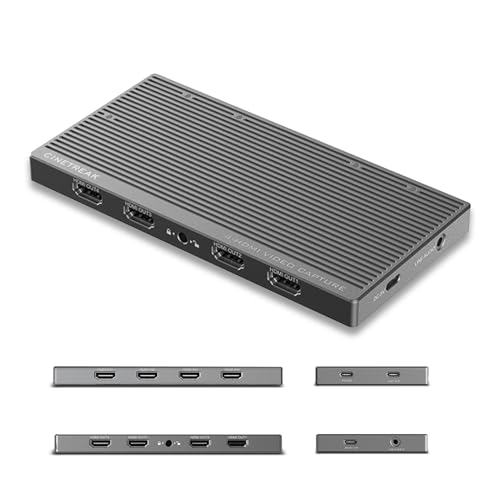
CineTreak CT-4 4K Video Capture Card with 4 HDMI Inputs

Osee GoStream Duet Kit Pro Multi-Camera Live Streaming Kit

YAMAHA MG10XU 10-Input Stereo Mixer with Effects
More Details On Our Top Picks
The Behringer X32 is the kind of console that grows with you, not against you. Where most of the picks on this list focus on video switching, the X32 sits firmly in the audio world, offering 40 inputs and 25 mix buses (independent signal paths you can route audio through) that handle a worship band’s worth of microphones and still have room for audience mics and a stereo feed from your video switcher.
For hybrid live streams where audio quality separates amateur from broadcast, this console has earned its reputation through years of road use. The motorized faders (physical sliders that move on their own to match your settings) and channel LCDs (per-channel display screens) speed up mixing during long sessions, and the built-in USB interface doubles as a multitrack recorder or a direct feed into your streaming PC. You may find the menu depth steep if you have never touched a digital console before, but for anyone running a serious production, that depth is the point.
Why It Works Well
- 32 programmable MIDAS preamps (onboard microphone amplifiers known for clean gain) handle large mic counts without outboard gain boosters
- 25 motorized faders let you recall complex scenes instantly, useful when running scripted shows
- Built-in 32-channel USB audio interface feeds your streaming software without a separate sound card
- iPad and iPhone remote control gives you the freedom to mix from the audience or backstage
Things To Consider
- Learning curve is real: the menu system rewards study sessions before your first show
- The unit is heavy and rack-oriented, so it anchors a fixed install rather than a grab-and-go kit
Key Specs
Made For
Mid-size venues, churches, and hybrid producers who route serious audio alongside their video switcher.
Skip It When
You mainly need video switching: the Osee GoStream Deck covers that role with a much friendlier price tag.
Switching from one camera to another mid-stream is where most budget setups fall apart, and the Osee GoStream Deck is built around that exact pain point. With four HDMI inputs, two HDMI outputs, and a pair of USB-C ports handling webcam pass-through and SSD recording, it pulls double duty as a switcher and a streaming hub.
Compared to the Behringer X32, which lives in the audio domain, the GoStream Deck is squarely about vision. The NDI-updatable (Network Device Interface, a protocol that sends video over standard Ethernet cables) path matters for anyone scaling up later, since NDI lets you pull feeds from any camera on the network without long cable runs. The ethernet port adds live streaming and NDI input, and the headphone jack makes audio monitoring practical. In our view, this is the most balanced pick for content creators who want HDMI now and an upgrade path tomorrow.
Everyday Wins
- Four HDMI inputs plus two HDMI outputs cover most creator studios and small event rigs
- USB-C ports handle webcam output, computer connectivity, and external SSD recording
- NDI-updatable design future-proofs the unit as your streaming setup grows
- Headphone monitoring and dedicated audio inputs keep your sound checks honest
Honest Caveats
- No SDI (Serial Digital Interface, the locking pro video connector used in broadcast), so it is not a direct swap for existing broadcast cameras
- The setup menu assumes some familiarity with IP-based video, which can feel dense on day one
Right Fit For
Creators producing multi-camera content for YouTube, Twitch, or hybrid events who want one box to handle the switch and the stream.
Look Elsewhere When
You need built-in NDI without paying for the upgrade, in which case the CINETREAK Stream 1 is worth a look.
Mixing HDMI and SDI sources in one switcher used to mean renting a video village. The Osee GoStream Duet folds that flexibility into a single unit with four SDI and four HDMI inputs plus a USB-C source, plus support for NDI and direct SD or SSD playback. The result is a switcher that does not force you to standardize your camera fleet overnight.
Where the GoStream Deck above leans into HDMI simplicity, the Duet is the option for shops that already own SDI cameras or need the locking connectors for long cable runs. Landscape and portrait output support reflects the reality of social-first streams, and the GoStream control software plus Bitfocus Companion integration (a third-party control surface app) means you can drive the whole show from a laptop or stream deck. You may find the deep I/O (input/output) array overwhelming for a simple podcast, but that is not who this unit is for.
A Favorable Mix
- Eight physical video inputs (four SDI plus four HDMI) plus USB-C and NDI source support
- Luma and chroma key (green-screen style and brightness-based layering) effects enable overlays without extra software
- Bitfocus Companion compatibility lets you wire physical buttons to scene changes
- Portrait and landscape output ready for vertical social streams
Where It Is Less Suited
- Owners commonly report a learning curve when juggling so many input types at once
- It is overkill for one or two camera setups where the Osee GoStream Deck handles the job
Quick Facts
Who It Suits Best
Producers running hybrid camera fleets and anyone who needs broadcast connectors alongside consumer gear.
Where Another Pick Suits Better
Mobile streamers should consider the Osee GoStream Duet Kit, which bundles a monitor and travel case into one package.
The Mixer Plus answers a real question: do you really need a laptop to switch cameras? With a four-inch built-in screen, four HDMI inputs, and a footprint small enough to slip into a camera bag, it removes the screen and the software from the most common live-stream setups.
Where the Osee GoStream Duet above aims at full broadcast installations, the Mixer Plus is the lunchbox-sized alternative for educators, online-class hosts, and traveling presenters. The transition effects and zero-latency switching make it easy to cut between angles during a lecture or a worship session, and the unit pairs naturally with OBS (Open Broadcaster Software, a free streaming program) and Zoom for downstream streaming. For most classroom and small-meeting scenarios, the built-in preview is enough to leave the laptop closed.
A Strong Showing
- Built-in 4-inch preview display means you do not need a monitor just to see your sources
- Compact, portable chassis fits a small bag or a fixed classroom podium
- About 30 transition effects keep your cuts from feeling flat
- Plays nicely with OBS, Zoom, and YouTube workflows for downstream streaming
Small Caveats
- No SDI, so any SDI camera in your kit needs a separate converter
- The small built-in screen is great for confidence monitoring, though you may want a larger display for detailed graphics work
Best Suited To
Educators, small-church producers, and traveling presenters who switch between two to four HDMI sources on the go.
Consider Something Else When
You need PTZ (pan-tilt-zoom) camera control or dual RTMP (Real-Time Messaging Protocol, the format platforms use to receive a live feed) destinations, both of which the CINETREAK Stream 1 handles.
The Stream 1 is the workhorse choice for productions that outgrow a single streaming destination. It accepts four HDMI inputs and an AUX channel for media playback, then pushes your program out to two simultaneous RTMP endpoints. That dual-streaming feature alone makes it appealing for any event that needs to hit YouTube, Facebook, and a private CDN (content delivery network) at once.
Compared to the Mixer Plus above, the Stream 1 trades some portability for control. Built-in PTZ control (remote motorized camera direction and zoom) means a single operator can run multiple robotic cameras without a separate controller, and the chroma and luma keying handle lower-thirds and graphics overlays without a downstream keyer. The NDI-updatable path mirrors what the Osee GoStream Deck offers, so you can adopt network video later if your venue grows. Assuming a standard network with available PoE (Power over Ethernet) ports for PTZ cameras, the Stream 1 scales nicely with fixed installs.
What Makes Sense
- Dual RTMP streaming sends your feed to two platforms at the same time
- PTZ camera control cuts the need for a separate camera operator
- Chroma and luma keying build overlays directly in the switcher
- Two HDMI inputs accept 4K sources, which preserves detail through the pipeline
Trade-Offs To Consider
- The deeper feature set means owners commonly report spending an evening with the manual before the first clean show
- It is more switcher than a single-camera streamer needs, so casual users may pay for features they will not touch
Who Will Love This
Mid-size event producers and houses of worship that need PTZ control and multi-destination streaming in one box.
A Better Fit Elsewhere
Single-platform streamers focused on HDMI will find a friendlier experience in the Osee GoStream Deck.
The CT-4 is a capture card, not a switcher, but it solves a very specific streaming problem: feeding four HDMI sources into a computer at once. Plug-and-play UVC (USB Video Class, a standard that lets devices work without extra drivers) means no driver hunting, and the four inputs show up as independent cameras in OBS or vMix.
Where the Osee GoStream Duet earlier handles switching in hardware, the CT-4 pushes that work to your streaming software. That is a feature, not a compromise, for anyone who already lives inside OBS or vMix and wants the scene builder to do the heavy lifting. The 10 Gbps USB 3.2 link keeps the four channels of 4K flowing without dropped frames on a modern system, and 100 W passthrough charging means a single cable powers the laptop during long streams.
Key Advantages
- Four HDMI inputs appear as independent camera sources in OBS, vMix, or Zoom
- UVC plug-and-play removes driver installs on Windows, macOS, and Android
- 100 W passthrough charging simplifies a laptop-based streaming cart
- 10 Gbps USB 3.2 keeps four channels of 4K flowing without compression artifacts
What To Weigh
- No on-device switching, so you depend on your computer for every cut and transition
- You may find the 4K-per-channel ceiling constraining for high-frame-rate gaming at 120 fps
Feature Snapshot
Perfect Match For
Software-first streamers and gamers who prefer OBS scene control over a hardware switcher.
Reach For A Different Pick When
You want hardware switching with PTZ control: the CINETREAK Stream 1 is built for that workflow.
The GoStream Duet Kit takes the GoStream Duet switcher and pairs it with a 14-inch 1080p monitor, a silent cooling fan, mounting cheese plates, and a built-in DC-to-Type-C cable. The whole package weighs about 5 kg, which is light enough to carry to a venue without a road case.
Where the standalone Osee GoStream Duet earlier assumes you already own a monitor, the Kit answers the most common follow-up question: where do I see my preview? The monitor and switcher share a single power and data path, and the cheese plates accept standard 1/4-inch and 3/8-inch threads (the two most common mounting screw sizes for camera gear) for tripods and magic arms. Depending on how often you move locations, the bundled monitor alone may justify the kit over the bare switcher.
What It Does Well
- Bundled 14-inch 1080p monitor gives a usable preview without a separate purchase
- Single-cable DC-to-USB-C power simplifies the field setup
- Silent cooling fan keeps the unit quiet in classrooms and worship spaces
- Cheese plates accept standard mounting threads for tripods and arms
Possible Compromises
- You pay for the monitor even if you already own a perfectly good display
- At about 5 kg, the kit is portable but still heavier than a switcher-only option like the Mixer Plus
Whose Shelf It Belongs On
Mobile producers and on-location crews who want a self-contained switching station in one carry.
Swap It Out When
You already own a pro monitor and prefer the lighter bare switcher: the Osee GoStream Duet is the same hardware without the bundle.
The Yamaha MG10XU is a familiar sight on small stages, and for good reason. It is a ten-input analog mixer with USB connectivity and a built-in effects engine, which means podcasters and small streamers can plug a few mics in, run a USB cable to a laptop, and call it a day.
Where the Behringer X32 earlier lives in the digital deep end, the MG10XU is the analog alternative for anyone who just wants clean preamps and a simple computer feed. The onboard effects polish vocal tracks without a rack of outboard gear, and the Yamaha name tends to age well in a closet of cables. You may find ten inputs tight for a four-mic panel plus a stereo feed, so map your channel count before settling in. The honest read is that this is a sensible anchor for audio-only streams and a useful complement to a video switcher that lacks good preamps.
Real-World Strengths
- USB output streams clean stereo audio to your computer without a separate interface
- Built-in digital effects handle vocal polish without extra hardware
- Compact chassis fits a small desk or a portable rig
- Yamaha preamp reputation keeps the signal clean even at higher gain
Points To Note
- No video switching at all, so it pairs with another device rather than replacing one
- Ten inputs fill up faster than expected once you add playback sources and room mics
Built With In Mind
Streamers and podcasters who prioritize clean audio over multi-camera switching and want a simple USB path into their computer.
Where A Sibling Pick Shines
Anyone running a full video production will want the Osee GoStream Duet for video plus this mixer for audio.
Picking A Streaming Mixer That Actually Fits Your Rig
Audio and video live in different worlds, and the right pick depends on which world is giving you the most trouble. Audio-first producers should look at how many microphones they need to mix, whether they want multitrack recording into a DAW (digital audio workstation, the software used to record and edit audio), and whether they need remote control from a tablet during shows. The Behringer X32 and Yamaha MG10XU sit at opposite ends of that scale: deep digital control versus simple analog warmth.
Video-first producers should focus on the input count they need today and the input type they expect to need next year. SDI locks, HDMI is convenient, and NDI travels over your network. The Osee GoStream Deck, Osee GoStream Duet, and CINETREAK Stream 1 each handle a different slice of that mix. Creators who already live in OBS will find the CineTreak CT-4 capture card a comfortable fit, since it leans on software rather than a hardware switcher.
Finally, think about where the rig will actually live. A fixed install absorbs weight, power bricks, and rack ears without complaint. A portable kit needs every kilogram to earn its keep, which is where the Mixer Plus and the Osee GoStream Duet Kit pull ahead. Buyers who move venues every weekend benefit from a built-in monitor and a single-cable power path, while permanent studios can spread the work across a larger console and a separate preview display.
Shop Smart: Common Traps And Where The Money Goes
Where Shoppers Go Wrong
The most common mistake is buying a switcher for the cameras you have today and discovering too late that your next camera uses the other connector. Plan at least one input type ahead, since SDI and HDMI do not interchange without a converter. Another trap is underestimating power and cable needs. Multi-camera rigs pull more current and generate more cable clutter than a single-camera setup, and the right USB-C cable or right-angle HDMI adapter saves more frustration than a fancy preset.
The Case For Spending Up
Higher-tier models in this category earn their price through three quiet upgrades. Better preamps clean up vocals without aggressive noise reduction, motorized faders and PTZ control let one operator run a fuller show, and dual RTMP or NDI output opens the door to multi-destination streams without a second encoder. For anyone producing weekly content, those features stop being luxuries pretty quickly and start being time savers.
Frequently Asked Questions
What Is The Difference Between An Audio Mixer And A Video Switcher?
An audio mixer balances microphone and instrument levels into a stereo or multichannel feed, while a video switcher selects between camera sources and adds transitions. Some streaming rigs pair both, since audio and video are handled by separate gear.
Do I Need A Digital Mixer If I Already Use OBS?
OBS handles software-side mixing, but a hardware mixer or switcher still helps with live transitions, physical fader control, and routing multiple cameras or microphones without taxing your computer. For most multi-camera shows, hardware makes the operation smoother.
What Is NDI And Why Does It Matter For Streaming?
NDI stands for Network Device Interface, a protocol that sends video and audio over standard Ethernet cabling. It matters because it lets you place cameras anywhere on your network and pull their feeds into a switcher or streaming PC without long HDMI runs.
Can I Stream To Multiple Platforms At Once?
Yes, with a switcher or capture card that supports dual RTMP (Real-Time Messaging Protocol) or NDI output. The CINETREAK Stream 1 is one example that pushes a program feed to two destinations simultaneously, which is useful for events that need YouTube and a private feed at the same time.
How Many HDMI Or SDI Inputs Do I Actually Need?
Count the cameras and computer sources you expect to run, then add one extra for growth. Two HDMI inputs are enough for a basic talking-head setup, while panel shows and live events usually need three or four before the producer feels limited.



