

Live sound demands more than a list of inputs. You need routing that survives a chaotic load-in, preamps that hold up under screaming vocals, and enough flexibility to recover when a mic fails mid-set. The picks below span compact analog desks, multi-camera video switchers with embedded audio, stage snakes, and creator-focused bundles, so the right fit depends on whether you’re running a worship house, a club, a livestream, or a podcast.
A Snapshot Of The Selections

RGBlink mini-mx SDI Video Mixer Switcher with NDI & Faders

Behringer POWERPLAY P16-M 16 Channel Digital Personal Mixer

RGBlink mini-Edge SDI All-in-One Pro Live Streaming Mixer

Seismic Audio SARLX-16×25 16-Channel XLR Snake Cable (25 ft)

Yamaha MG10 10-Input Stereo Mixer (Black)

TENLAMP G10 Creator Audio Mixer Bundle with Microphone
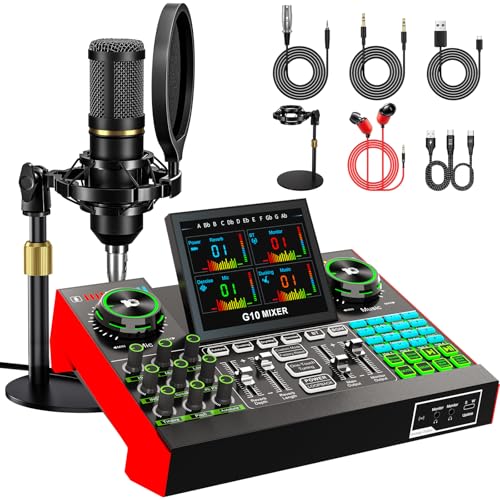
TENLAMP G10 Creator Podcast Equipment Bundle with Microphone

TENLAMP G9 Audio Mixer Bundle with Microphone
Why These Options Stand Out
The RGBlink mini-mx SDI sits in a hybrid lane, handling video switching and live audio in one chassis. You get four HDMI 2.0 inputs alongside four 3G-SDI connections, which means DSLRs, broadcast cameras, and PTZ rigs can all feed the same surface without adapter gymnastics. For a worship house running two camera locked shots and one handheld, that headroom is genuinely useful rather than theoretical.
Where this unit earns its keep is the streaming pipeline. NDI|HX2 support and dual HDMI outputs let you push program out to an encoder while a separate confidence monitor keeps the operator honest. The onboard 8-channel audio mixer handles mic and line sources, so smaller productions can skip a dedicated console entirely.
Useful Touches
- Four HDMI 2.0 plus four 3G-SDI inputs cover most hybrid camera lineups out of the box
- USB 3.0 UVC output drops straight into OBS, Zoom, or Teams without capture cards
- NDI|HX2 workflow reduces cabling on multi-camera shows, which speeds load-in
- Physical faders give tactile control during fast cuts, a real help for new operators
- RTMP(S) streaming support removes the need for a separate encoder box
Things To Consider
- Firmware updates have occasionally introduced workflow changes, so reading release notes before show day is wise
- The learning curve is steeper than a pure analog desk, and you may need a few sessions to feel fluent
Who It Suits Best
Mid-sized houses of worship, schools, and small broadcast setups running a true multi-camera live stream.
Where Another Pick Suits Better
Solo podcasters and home streamers get more value from the TENLAMP G10 Creator bundle, which costs less and skips the video routing entirely.
The Behringer P16-M is a personal monitor mixer, not a front-of-house console, and that distinction matters. It hands each performer a 16-channel digital stereo mixer to shape their own in-ear mix, freeing the FOH engineer from constant “more vocal” requests. On a loud club stage with four-piece bands, that autonomy usually improves the show for everyone.
It pairs with Behringer’s Powerplay distribution system, running audio and power over a single Cat 5 cable per station. That cuts down on the cable spaghetti behind the drum riser and makes the P16-M appealing for touring acts who set up and break down often.
Bright Spots
- 16 channels of personal mix control lets vocalists, guitarists, and drummers tune their own wedge or IEM feed
- Single-cable connection to the distribution hub reduces stage clutter significantly
- Compact desktop footprint fits on a keyboard stand or small side table
Honest Caveats
- Requires Behringer’s Powerplay distribution hub to function, which is a separate purchase
- Not a front-of-house mixer, so solo artists working without a band may not need this layer of control
Key Attributes
Made For
Bands running their own in-ear monitor mixes on mid-sized stages with a dedicated FOH engineer.
Reach For A Different Pick When
A solo acoustic act in a coffeehouse will find the Yamaha MG10 a more appropriate, simpler centerpiece.
Think of the mini-Edge as the mini-mx’s bigger sibling, with a 5.5-inch built-in screen and PTZ camera control on top of the same multi-source switching approach. Where the smaller unit leans on an external monitor, the Edge lets you preview, program, and adjust cameras from one device. For a one-person production crew, that consolidation is the headline feature.
It also accepts 4K HDMI alongside 3G-SDI, which is helpful if you’re mixing prosumer mirrorless cameras with broadcast PTZ heads. The 8-channel audio mixer handles podcast-style setups and small worship bands, though dedicated FOH desks will still outperform it on stage.
Where It Excels
- 5.5-inch built-in screen removes the need for a separate preview monitor on small rigs
- PTZ camera control from the same surface streamlines single-operator productions
- 4K HDMI and 3G-SDI inputs handle both consumer and broadcast camera sources
- UVC plus NDI|HX2 streaming options let you route video to multiple platforms
Points To Note
- Audio mixer is functional but limited compared to a dedicated console for full bands
- Firmware updates can shift menu layouts, so saving preset files is a wise habit
Best Suited To
Solo streaming producers, small broadcast teams, and content creators running PTZ-heavy multi-camera shows.
Look Elsewhere When
Live bands that need a robust front-of-house analog path will get more from the Yamaha MG10 paired with the Seismic Audio snake.
A stage snake isn’t a mixer, but no live rig is complete without one, and the Seismic Audio SARLX-16×25 is the kind of unglamorous workhorse that quietly saves every show. Sixteen labeled female XLR sends on stage pair with sixteen male XLR returns at the mixer, all wrapped in a shielded, balanced cable rated for road abuse.
The 25-foot length hits the sweet spot for small clubs and medium stages, where longer runs add cost and shorter ones leave you kneeling next to FOH. Each channel is numerically labeled and color coded, which speeds up troubleshooting when something goes wrong mid-set.
Where It Helps
- 16 balanced and shielded channels keep hum and interference at bay on long runs
- Color-coded and numbered channel groups make setup and patching faster
- 25-foot length suits small-to-medium stages without excess slack to trip over
Worth Bearing In Mind
- 25 feet can be limiting on larger stages, so measure before committing
- Rougher handling over time may expose the stage box connectors, a commonly reported wear pattern with mobile rigs
Perfect Match For
Mobile bands, small worship teams, and studio owners consolidating messy cable runs into a single trunk.
Skip It When
Solo creators working from a desktop can skip the snake entirely and connect a single USB interface like the TENLAMP G10 bundle instead.
The Yamaha MG10 is the desk you hand to someone learning live sound, and the one you keep reaching for on small gigs because nothing breaks. Ten inputs cover a duo, a worship team, or a panel discussion without breaking a sweat, and the XLR connectivity means real microphones plug straight in.
Yamaha’s D-PRE preamps have a reputation for clean, full-range sound that flatters vocals, and switchable phantom power handles condenser mics. A pad switch gives you headroom on hot sources, and the analog layout means the controls do exactly what they look like they do, no menu diving required.
Everyday Advantages
- D-PRE preamps deliver clean, articulate vocal tone without coloration
- Switchable phantom power supports condenser microphones for studio-style sources
- Pad switch preserves headroom on loud kick drums or hot vocal mics
- Analog layout means zero menu navigation, which speeds up live adjustments
- Compact form factor fits on a small table or laptop stand for portable rigs
- Balanced XLR outputs integrate cleanly with powered speakers and recording interfaces
Less Ideal Details
- No built-in effects engine, so external reverb units are needed for live vocal polish
- Ten inputs limit larger ensembles, particularly full bands with multiple keyboard rigs
Feature Snapshot
Whose Shelf It Belongs On
Solo acoustic acts, small worship teams, and beginners who want a reliable analog foundation.
A Better Fit Elsewhere
Multi-camera live streaming producers get more from the RGBlink mini-mx, which adds video switching on top of audio mixing.
The TENLAMP G10 lands squarely in creator territory, pairing an audio mixer with a condenser microphone so you can stop mixing-and-matching accessories from three different brands. Voice effects and auto-tune sit alongside noise reduction, which means podcast banter and karaoke sessions both work without external software.
Bluetooth input is the convenience play, letting you bring phone audio into a stream or pull up a backing track without cables. Compared to the RGBlink mini-mx, the G10 is a fraction of the price and a fraction of the complexity, with no multi-camera routing to learn.
What It Does Well
- Built-in voice effects and auto-tune add personality without third-party plugins
- Noise reduction cleans up untreated rooms that would otherwise ruin a recording
- Bluetooth input streams backing tracks or phone audio wirelessly
- Bundle approach skips the accessory hunt, which saves setup time
Trade Offs
- Not designed for live bands, so instrumentalists should look at analog options like the Yamaha MG10
- Voice-effect-heavy feature set can feel gimmicky for serious podcast production
- Microphone is condenser-based and benefits from a quiet, treated room to shine
Right Fit For
Streamers, podcasters, and home creators who want a single bundle that covers capture and processing.
Consider Something Else When
You mainly mix live instruments on stage, where the Behringer P16-M or Yamaha MG10 do the job more cleanly.
The TENLAMP G10 Podcast Bundle shares its core mixer with the streaming-oriented G10 above, but swaps the condenser mic for a 3.5mm-equipped option that pairs well with both dynamic and 48V phantom-powered microphones. The disk bracket and included accessories make it a one-box solution for first-time podcasters.
For someone spinning up a podcast in a spare bedroom, that consolidation matters more than flagship specs. You get the sound board, the mic, and the cables, which removes the decision fatigue that derails a lot of new shows.
Benefits That Matter
- Sound board accepts both 3.5mm and 6.35mm microphones, including 48V condenser models
- Disk bracket provides a stable desktop mount for the included microphone
- All-in-one package simplifies the first-time setup, which is often where new podcasters stall
- No complicated routing needed, so beginners can focus on content instead of cables
Possible Compromises
- Included microphone is a starter-tier component, and serious producers will likely upgrade eventually
- Limited channel count makes multi-host shows with more than two guests awkward
Who Should Grab It
First-time podcasters and hobbyist streamers who want a complete, low-fuss starter kit out of the box.
Another Choice May Suit
Established creators chasing higher channel counts and better preamps will be happier with the Yamaha MG10 plus a dedicated condenser mic.
The TENLAMP G9 is the casual option in the lineup, aimed at karaoke nights, casual streaming, and home content creation where the goal is fun rather than broadcast polish. A 3.5mm condenser mic pairs with the audio mixer, and the smart noise reduction keeps the signal clean even when the room isn’t.
Compared to the more streaming-focused G10 Creator bundle, the G9 trims some voice-effect features in favor of simpler operation. For a family karaoke setup or a bedroom streamer just getting started, that pared-back approach is often the right call.
Practical Advantages
- Compact bundle works well in small home spaces without dominating the desk
- Smart noise reduction helps untreated rooms sound cleaner on streams
- 3.5mm condenser microphone plugs in without extra adapters or interfaces
- Simple operation makes it approachable for casual users and family setups
Points To Keep In Mind
- Limited headroom for louder sources means it’s not the right tool for live instruments
- Microphone quality is a step below the G10 Creator bundle, so upgrading later is likely for serious creators
Feature Card
Built With In Mind
Home karaoke enthusiasts, casual streamers, and families wanting an all-in-one audio setup for a living room.
Swap It Out When
You graduate to a multi-host podcast or a hybrid live stream, where the TENLAMP G10 Creator bundle or Yamaha MG10 offer more room to grow.
What Matters Most Before Choosing Audio Mixers For Live Performance
Channel Count And Headroom
Count your active inputs and then add two. A solo acoustic act with two mics and a DI usually lands well on a 10-input desk, but a five-piece band with multiple vocalists and playback will outgrow that quickly. Headroom matters just as much as channel count, because loud kick drums and aggressive vocalists will push preamps into distortion if there’s no pad switch or quality op-amp in the signal chain.
Connectivity And Cable Runs
Analog XLR remains the lingua franca of live audio, and balanced connections reject hum over long cable runs, which is where the Seismic Audio snake earns its place. Hybrid video rigs add HDMI, SDI, and increasingly NDI|HX2 (a network protocol that carries video and audio over standard Ethernet), so picking a unit that matches your camera inventory saves adapter headaches down the road. Solo creators on a desktop often skip the snake entirely and rely on USB or Bluetooth.
Preamps, Phantom Power, And Routing
The preamp shapes the fundamental tone of every microphone that hits the desk. Yamaha’s D-PRE preamps in the MG10 are well-regarded for clean, full-range sound, while cheaper units can add a thin or brittle edge that no EQ will fully fix. Phantom power (the 48V that condenser microphones need to operate) is essential for studio-style condensers, and a pad switch is a quiet luxury that prevents distortion on hot sources.
Key Considerations Across These Picks
Pitfalls Shoppers Hit
Treating channel count as the only spec is the most common trap, because preamp quality and routing flexibility shape daily use far more than a single number. Another slip is buying a video switcher when you actually need an audio desk, or vice versa, since overlap exists but rarely fully replaces either role. Skipping cable planning is a quieter mistake, and a stage rig without a proper snake will look messy and fail faster.
Where The Extra Money Goes
Higher-tier mixers typically buy better preamps, more robust build quality, and digital routing that small desks can’t replicate. A premium analog desk like the Yamaha MG10 still pays off in sound quality and longevity, while stepping up to a multi-camera switcher like the RGBlink mini-Edge trades pure audio fidelity for unified video and audio control. The honest read is that the upgrade only matters once your shows demand it, and many smaller gigs never reach that threshold.
Frequently Asked Questions
How many channels do I need for a small live show?
A duo or solo acoustic act usually fits comfortably on a 10-input desk like the Yamaha MG10, while a four-piece band typically wants 16 or more channels to cover vocals, instruments, and playback. Always count active sources and add a few extras for unexpected inputs.
Do I really need a stage snake for a small venue?
For very small stages where the mixer sits within a few meters of performers, you can manage with individual XLR runs, but a stage snake like the Seismic Audio SARLX-16×25 simplifies setup dramatically. The cable consolidation alone saves real time at load-in and load-out.
What is NDI and do I need it?
NDI is a network protocol that carries video and audio over standard Ethernet cabling, which reduces the need for dedicated SDI or HDMI runs. You only need NDI support, like that on the RGBlink mini-mx, if you’re building a multi-camera live streaming workflow with PTZ cameras.
Can a creator bundle replace a dedicated audio mixer?
For streaming, podcasting, and karaoke, a bundle like the TENLAMP G10 Creator or G9 Podcast covers capture and processing in one package. For live bands, worship teams, or front-of-house work, a dedicated mixer with proper preamps and routing remains the right call.
What is phantom power and when do I need it?
Phantom power is a 48V signal sent through XLR cables to power condenser microphones, which need external power to operate. Dynamic mics ignore it, but any condenser source requires a mixer or interface with phantom power switched on.



